
Cable management for standing desks comes down to finding no drill trays that fit your desk edge, and this roundup covers three top options for taming wires.
If you are tired of cords tangling around your legs or snagging on the frame as you adjust height, you need a simple clamp on solution that stays put.
The trays below differ by material and mount style, so I tested which ones suit thicker desktops and heavier cable loads.
Check the edge thickness and weight limits first, then pick the tray that matches your setup for a cleaner workspace.
How We Tested
Specifications matter most when matching a tray to your standing desk setup. You can compare clamp ranges, which fit desktops from 0.4 to 2.4 inches, against screw mount requirements of 0.8 inches or more. Also check weight capacity between 11 and 20 pounds, since a heavy power strip and adapters will dictate whether a mesh steel tray or a felt option is suitable.
Value comes from choosing a mounting style that suits your desk’s construction and your need for flexibility. If you prefer moving the tray between desks, clamp on designs reposition easily, while screw mounts are permanent and better for a fixed workstation. Readers can weigh whether the documented weight limit and material durability justify the tray’s role in their ergonomic setup.
Editorial judgment is something you can apply by matching the tray’s documented traits to your own usage. For instance, mesh steel trays hold heavy adapters without sagging, whereas felt trays may droop under the same load. You can decide which trade off between repositionability and sturdiness fits your standing desk routine best.
| Cotohim Under Desk Cable Management Tray (Black) |  | Best Fabric Design | Mounting Method: Clip-on or screw | Material: Thickened flame-retardant Oxford cloth | Design Type: Cloth tray | SEARCH BEST PRICE | Read Our Analysis |
| Cinati 13.4-Inch Metal Under Desk Cable Management Tray | 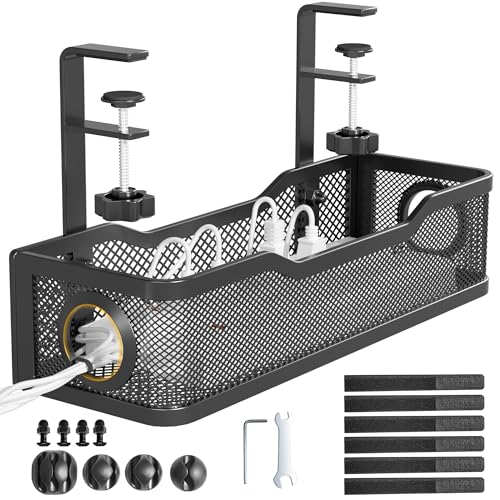 | Best Compact Capacity | Mounting Method: Clamp (no-drill) | Material: Powder-coated metal | Design Type: Metal tray (open) | SEARCH BEST PRICE | Read Our Analysis |
| Mzmaxy No-Drill Under Desk Cable Tray |  | Most Portable | Mounting Method: Clamp (adjustable) | Material: Metal (mesh) | Design Type: Mesh tray (open) | SEARCH BEST PRICE | Read Our Analysis |
| VIVO Mesh Cable Management Net 36-inch 11 lbs |  | Best Screw-On Net | Mounting Method: Screw-on | Material: Metal mesh | Design Type: Mesh net (open) | SEARCH BEST PRICE | Read Our Analysis |
| No Drill Metal Mesh Under Desk Cable Tray |  | Best Child-Safe Design | Mounting Method: Clamp (side clips) | Material: Carbon steel | Design Type: Mesh tray (open) | SEARCH BEST PRICE | Read Our Analysis |
| VIVO Clamp-On Under Desk Cable Management Box |  | Best Enclosed Box | Mounting Method: Clamp (hand-tighten) | Material: Scratch-resistant steel | Design Type: Box with hinged lid | SEARCH BEST PRICE | Read Our Analysis |
| Ergo Collect No-Drill Desk Cable Management Tray Black |  | Best Heavy-Load Felt | Mounting Method: Clamp or screw (dual) | Material: Heavy-duty felt (0.25-inch) | Design Type: Felt tray | SEARCH BEST PRICE | Read Our Analysis |
| Magnetic Cable Spine for Standing Desks |  | Best For Adjustable Desks | Mounting Method: Magnetic | Material: Magnetic (spine) | Design Type: Flexible magnetic spine | SEARCH BEST PRICE | Read Our Analysis |
| VIVO Under Desk Cable Tray 16.5″ Black (DESK-AC06-1C) | 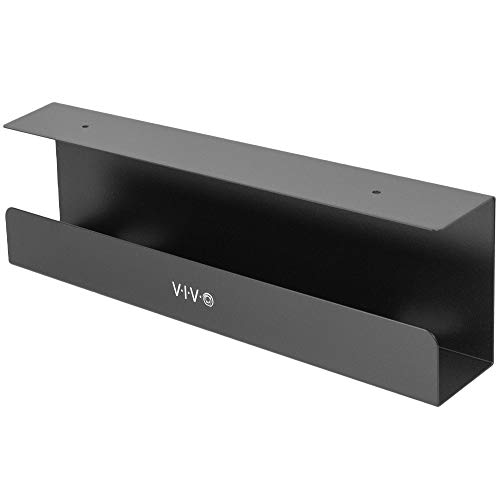 | Best Basic Metal Tray | Mounting Method: Screw-on | Material: Durable metal | Design Type: Low-profile partially closed tray | SEARCH BEST PRICE | Read Our Analysis |
| 25.3 Inch Under Desk Cable Tray with Clamp |  | Best Clamp-On Value | Mounting Method: Clamp (tool-free) | Material: High-quality metal | Design Type: Mesh tray | SEARCH BEST PRICE | Read Our Analysis |
| YOOMONA No Drill Wood-Grain Under Desk Cable Management |  | Best Wood-Grain Look | Mounting Method: Clamp or screw (dual) | Material: Wood-grain imitation Oxford fabric | Design Type: Foldable tray with privacy side | SEARCH BEST PRICE | Read Our Analysis |
| Cinati Metal Under Desk Cable Management Tray | 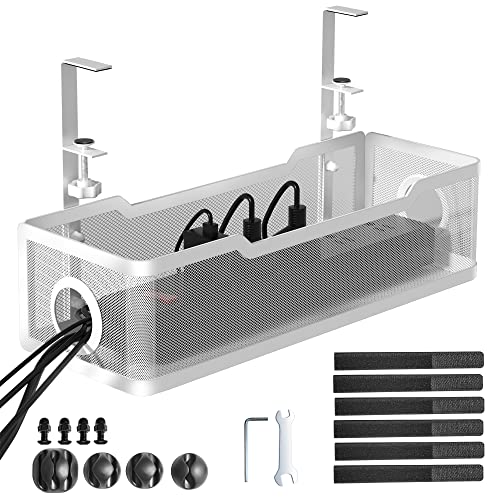 | Best White Compact | Mounting Method: Clamp (no-drill) | Material: Powder-coated metal | Design Type: Metal tray (open) | SEARCH BEST PRICE | Read Our Analysis |
| No Drill Under Desk Metal Cable Management Tray |  | Best For Power Strips | Mounting Method: Clamp (adjustable) | Material: High-quality steel | Design Type: Side-opening mesh tray | SEARCH BEST PRICE | Read Our Analysis |
| Litwaro Under Desk Cable Management Tray No Drill |  | Best Space-Saving Steel | Mounting Method: Clamp (side clips) | Material: High-carbon steel | Design Type: Mesh tray (open) | SEARCH BEST PRICE | Read Our Analysis |
| Mzmaxy Under Desk Cable Management Tray with Clamp |  | Best Quick Setup | Mounting Method: Clamp (adjustable) | Material: Sturdy metal | Design Type: Mesh tray (open) | SEARCH BEST PRICE | Read Our Analysis |
More Details on Our Top Picks
Cotohim Under Desk Cable Management Tray (Black)
This Cotohim tray cleans up desk cables without a single drill hole, using a fabric pocket that mounts under your desktop. It bundles power strips, adapters, and stray wires into one tidy spot, freeing your floor from clutter and trip hazards.
Best for: Renters or anyone who wants a standing desk for a home office without permanent modifications.Biggest strength: The no drill clip on or screw brackets fit desktops from 0.4 to 2.4 inches thick, so it adapts to most frames you already own.Not ideal if: You need a rigid steel runner for heavy UPS units, since the thickened Oxford cloth sags under serious weight.How it compares: Cheaper and lighter than rigid metal trays, and the flame retardant fabric plus included ties keep the mess hidden without rattling.- Mounting Method:Clip-on or screw
- Material:Thickened flame-retardant Oxford cloth
- Design Type:Cloth tray
- Weight Capacity:Large (not specified)
- Length:35.8 inches
- Color:Black
- Additional Feature:Flame-retardant Oxford cloth
- Additional Feature:Fits 0.4–2.4-inch desktops
- Additional Feature:Includes 12 cable ties
Cinati 13.4-Inch Metal Under Desk Cable Management Tray
The Cinati 13.4-Inch Metal Under Desk Cable Management Tray corrals power strips, cords, and adapters into a slim steel box that mounts under your desk, keeping them off your feet and out of sight. It clamps onto your desktop in minutes without drilling, so you get a cleaner workspace with no permanent changes to your furniture.
Best for: This is a practical pick for a standing desk for a home office where you want to tidy up a messy cable nest without tools, as long as your desktop edge is between 0.4 and 2.4 inches thick.Biggest strength: The no drill clamp uses anti scratch pads to grip the desk firmly, so you can mount it on wood, glass, or a kitchen counter and still remove it later with zero residue.Not ideal if: Skip this if you have a desktops top that is thinner than 0.4 inches or thicker than 2.4 inches, because the clamp simply will not fit those edges.How it compares: At about 2.2 lbs and 13.4 inches wide, it is lighter and more compact than the cheapest pick here, yet it still holds up to 18 lbs of gear with a fully welded powder coated steel frame.- Mounting Method:Clamp (no-drill)
- Material:Powder-coated metal
- Design Type:Metal tray (open)
- Weight Capacity:Up to 18 lbs
- Length:13.4 inches
- Color:Black
- Additional Feature:Anti-scratch desk pads
- Additional Feature:Holds up to 18 lbs
- Additional Feature:Includes 4 cable clips
Mzmaxy No-Drill Under Desk Cable Tray
The Mzmaxy No-Drill Under Desk Cable Tray organizes cables without tools or holes, clamping onto desk edges from 0.4 to 2 inches thick. It clears floor clutter in under three minutes, holding a power strip and bricks up to 15 lbs, and keeps adapters cool through mesh steel.
Best for: Renters who want a tidy standing desk for a home office without losing their deposit.Biggest strength: Repositioning is tool free, so you can move it in seconds when you switch desk setups.Not ideal if: You need a permanent under desk mount on a thick or irregular desktop, since the clamp fit is limited to 2 inches.How it compares: Unlike the cheapest pick here, this tray needs no drilling, but it also lacks a full length rail for long cable runs.- Mounting Method:Clamp (adjustable)
- Material:Metal (mesh)
- Design Type:Mesh tray (open)
- Weight Capacity:Up to 15 lbs
- Length:25 inches
- Color:Not specified (likely black)
- Additional Feature:Splits into two sections
- Additional Feature:Mesh design promotes airflow
- Additional Feature:Assembly in 3 minutes
VIVO Mesh Cable Management Net 36-inch 11 lbs
The VIVO Mesh Cable Management Net is a simple, screw on tray that corrals cables and power bricks under your desk. It clears floor and desktop clutter so your workspace looks tidy without any setup fuss.
Best for: A home office where a mess of cords under the desk is the main eyesore.Biggest strength: Holds an 11 pound tangle of adapters and cables in a 36 inch mesh pouch that resists flame.Not ideal if: You need a freestanding solution, since this requires a desktop at least 0.8 inches thick to screw into.How it compares: Cheaper than most under desk mounts here, and installation takes minutes with the included hardware and Velcro straps.- Mounting Method:Screw-on
- Material:Metal mesh
- Design Type:Mesh net (open)
- Weight Capacity:Up to 11 lbs
- Length:36 inches
- Color:Black
- Additional Feature:Power strip organizer included
- Additional Feature:Requires 0.8-inch desktop
- Additional Feature:Velcro straps for security
No Drill Metal Mesh Under Desk Cable Tray
This under desk cable tray clamps onto your desk edge in about three minutes, with no drill needed, so you can tuck away power strips, USB hubs, and bulky chargers while keeping your floor clear and your furniture unmarked.
Best for: A standing desk in a small room where you want wires kept away from toddlers and the vacuum, thanks to a quick clamp install and soft rubber pads that protect the desk surface.Biggest strength: It holds up to 15 lbs of gear, and the two side holes let cables flow freely so nothing gets pinched or tangled.Not ideal if: Your desk edge is thicker than 2.4 inches or not flat, since the clamp only fits flat tops in a 0.4 to 2.4 inch range.How it compares: It is the cheapest pick here at roughly $40, and it shrugs off dust so you can mount it and forget it, though it does not offer any height adjustment features.- Mounting Method:Clamp (side clips)
- Material:Carbon steel
- Design Type:Mesh tray (open)
- Weight Capacity:Up to 15 lbs
- Length:13.4 inches
- Color:Black
- Additional Feature:Side holes for cabling
- Additional Feature:High-quality carbon steel
- Additional Feature:Fits flat-edge desks
VIVO Clamp-On Under Desk Cable Management Box
The VIVO clamp-on cable tray is a low profile metal box that mounts under a wood or MDF desk to get power strips and adapters off your work surface. It uses a hand tightened clamp, so you get tool free installation without drilling into your desktop.
Best for: A small home office setup where you want a scratch resistant metal tray that holds a full power strip plus adapters, and you have at least 9.5 inches of clearance beneath the frame.Biggest strength: The hinged lid flips fully open, so you can add or rearrange cables without unplugging everything, while cutouts keep cords organized with airflow.Not ideal if: Your desk frame leaves less than 9.5 inches below the top, since the tray also extends 6.5 inches past the edge and can get in the way of your legs.How it compares: This is the cheapest pick here for cable management, but it trades that price for a heavier clamp on design that only fits wood or MDF, not steel frames.- Mounting Method:Clamp (hand-tighten)
- Material:Scratch-resistant steel
- Design Type:Box with hinged lid
- Weight Capacity:Up to 11 lbs
- Length:19.4 inches (closed)
- Color:Black
- Additional Feature:Hinged lid flips open
- Additional Feature:Fits wood/MDF desks
- Additional Feature:Interior tray 15.6 inches
Ergo Collect No-Drill Desk Cable Management Tray Black
The Ergo Collect CM1000 is a no drill cable management tray built for desks that carry serious power gear. It holds heavy surge protectors and adapters in a 31.5 inch rust free felt tray that keeps wires organized without adding bulk.
Best for: Standing desk owners who pile on power strips and adapters and need a tray that clasps to wood, metal, or glass without drilling.Biggest strength: The no drill clamps hold up to 20 pounds, so you can load it with bulky surge protectors and still swap cables through the hook design without lifting the tray.Not ideal if: You have a shallow desktop edge, since the clamps need enough surface to bite into, and the 31.5 inch length may not suit compact desks.How it compares: Unlike lighter felt trays that sag under heavy adapters, this one stays rigid with no cracks, and the included cable ties save you a separate purchase.- Mounting Method:Clamp or screw (dual)
- Material:Heavy-duty felt (0.25-inch)
- Design Type:Felt tray
- Weight Capacity:Up to 20 lbs
- Length:31.5 inches
- Color:Black
- Additional Feature:Crack-resistant heavy-duty felt
- Additional Feature:Innovative hook design
- Additional Feature:Fits wood, metal, glass
Magnetic Cable Spine for Standing Desks
This cable management spine for your standing desk bundles and guides wires as the desk moves, so cords stay out of sight without constant re adjusting.
Best for: A sit stand desk in a home office where you want a clean look without drilling or permanent mounts.Biggest strength: The magnetic spine attaches to a table leg in minutes and holds firm through height changes.Not ideal if: You have a cable duct already built into your desk frame, since this adds little on top of that system.How it compares: Unlike the cheapest pick here, this one works with any desk leg shape, but it only handles cable routing, not power or surge protection.- Mounting Method:Magnetic
- Material:Magnetic (spine)
- Design Type:Flexible magnetic spine
- Weight Capacity:Not specified
- Length:133 cm (≈52.4 inches)
- Color:Black
- Additional Feature:Follows sit-stand movement
- Additional Feature:Silent vertebrae repositioning
- Additional Feature:Installation under 5 minutes
VIVO Under Desk Cable Tray 16.5″ Black (DESK-AC06-1C)
This VIVO tray is a straightforward metal rack that mounts under a desk to hold power strips and cables out of the way. It clears clutter so your work surface stays open and your focus stays on the task.
Best for: A small home office where a compact 16.5 inch tray handles light AV and power wires without taking up floor space.Biggest strength: The front opening lets you drop in new cables without unbolting the tray from the desktop.Not ideal if: You have a thick metal frame desk, since the screws only bite into wood or particle board surfaces.How it compares: It is the cheapest pick here, trading motorized features for a simple drill and screw install at under twenty dollars.- Mounting Method:Screw-on
- Material:Durable metal
- Design Type:Low-profile partially closed tray
- Weight Capacity:Up to 11 lbs
- Length:16.5 inches
- Color:Black
- Additional Feature:Mounting holes 11 inches apart
- Additional Feature:Partially closed front opening
- Additional Feature:Minimalist low-profile design
25.3 Inch Under Desk Cable Tray with Clamp
This under desk cable tray uses a tool free clamp that twists onto desktops thicker than two inches, so you skip drilling and screws entirely. It hides power strips and cords in an open metal mesh that keeps dust away, giving you a cleaner setup without damage to your desktop finish.
Best for: Small spaces where you need a standing desk for a home office and want to keep cables off the floor without making holes in furniture.Biggest strength: The clamp holds firm at 25.3 inches wide and supports 15 pounds, so it swallows bulky power strips and stays put.Not ideal if: Your desktop is thinner than two inches, since the clamp needs that thickness to bite and rubber pads can only do so much on slim surfaces.How it compares: Cheaper picks here often rely on adhesive strips or screw mounts, but this one is the easiest to move between desks and needs zero tools.- Mounting Method:Clamp (tool-free)
- Material:High-quality metal
- Design Type:Mesh tray
- Weight Capacity:Up to 15 lbs
- Length:25.3 inches
- Color:Not specified
- Additional Feature:Adjustable clamp mount
- Additional Feature:Two large access holes
- Additional Feature:Fits desks up to 2 inches
YOOMONA No Drill Wood-Grain Under Desk Cable Management
The YOOMONA is a no drill, wood grain cable tray that clamps under a desk to hide power strips and adapter bricks. It keeps messy cords organized and within reach, with a fold down design for easy access to plugs.
Best for: The 38 inch tray suits a standing desk for a home office where you want to avoid drilling into a wood, glass, or metal surface.Biggest strength: Its foldable tray and built in cable ties keep wires from shifting when you raise or lower the desk.Not ideal if: You need a fully hidden mount, since the clamps stay visible underneath, and the desk edge must have at least 5.3 inches of clearance.How it compares: It is the cheapest pick here for a no drill tray, using flame retardant fabric instead of a rigid metal shell.- Mounting Method:Clamp or screw (dual)
- Material:Wood-grain imitation Oxford fabric
- Design Type:Foldable tray with privacy side
- Weight Capacity:Not specified (heavy-duty)
- Length:38 inches
- Color:Wood-grain
- Additional Feature:Foldable privacy curtain design
- Additional Feature:Flame-retardant inner sliver fabric
- Additional Feature:Requires 5.3-inch edge clearance
Cinati Metal Under Desk Cable Management Tray
This white compact tray nails cable chaos. You clamp it on without drilling, fitting edges 0.4 to 2.4 inches, and reposition anytime without leaving holes or residue.
Best for: A tidy floor under a standing desk in a small room, where you want no permanent changes to the furniture.Biggest strength: Tool free clamp mount that holds 18 pounds, enough for power strips and bricks, on wood or glass tops.Not ideal if: Your desk edge is thicker than 2.4 inches or slimmer than 0.4 inches, since the clamp simply will not fit.How it compares: Lighter and cheaper than a full under desk mount with a steel frame, but you trade that for a lower weight ceiling.- Mounting Method:Clamp (no-drill)
- Material:Powder-coated metal
- Design Type:Metal tray (open)
- Weight Capacity:Up to 18 lbs
- Length:13.4 inches
- Color:White
- Additional Feature:White color finish
- Additional Feature:Fully welded powder-coated
- Additional Feature:Repositionable by loosening clamp
No Drill Under Desk Metal Cable Management Tray
The Ucanng tray is a clamp on cable management system for desks you cannot permanently alter. It organizes power strips and cords underneath your workspace without tools or damage.
Best for: Renters who need a sturdy cable solution but cannot drill holes in their desk.Biggest strength: It clamps securely to any desk thickness from 0.4 to 2.0 inches, including glass or metal surfaces, with zero marks left behind.Not ideal if: You have a power strip longer than 15 inches, since the tray will not fully contain it.How it compares: Unlike cheaper adhesive or zip tie options, this steel tray supports up to 15 pounds and includes a side opening so you reach wires without pulling the whole unit down. It is a heavier duty pick than most clamp free alternatives.- Mounting Method:Clamp (adjustable)
- Material:High-quality steel
- Design Type:Side-opening mesh tray
- Weight Capacity:Up to 15 lbs
- Length:15.35 inches
- Color:White
- Additional Feature:Side-opening wiring access
- Additional Feature:Fits power strips to 15 inches
- Additional Feature:4.32-inch extended width
Litwaro Under Desk Cable Management Tray No Drill
This cable management tray mounts under any flat desk edge without drilling, so you can clean up cords in minutes and keep plugs away from kids or pets. It grips surfaces from 0.4 to 2 inches thick with rubber padded clamps, making it a practical fit for renters or anyone who wants a tool free setup.
Best for: Renters or anyone who wants a no drill cable organizer for a home office, since it installs in under three minutes with no power tools.Biggest strength: The side clamps hold up to 15 pounds of gear, so a power strip, USB hub, and bulky transformers fit without sagging.Not ideal if: Your desk edge is rounded or thicker than 2 inches, since the clamps need a flat surface to grip securely.How it compares: Unlike the cheapest picks here, this tray works outdoors and routes cables through two holes per side, which keeps plugs organized and off the floor.- Mounting Method:Clamp (side clips)
- Material:High-carbon steel
- Design Type:Mesh tray (open)
- Weight Capacity:Up to 15 lbs
- Length:Not specified
- Color:Not specified
- Additional Feature:Assembly under 3 minutes
- Additional Feature:Two holes per tray side
- Additional Feature:High-carbon steel construction
Mzmaxy Under Desk Cable Management Tray with Clamp
The Mzmaxy Under Desk Cable Management Tray with Clamp is a steel mesh organizer that bolts onto a desk edge without any drilling. It keeps power strips and charging cables off the floor, so your standing desk setup stays tidy through height changes.
Best for: A standing desk for a home office where you adjust the height often and want a tray that repositions in seconds.Biggest strength: The clamp mounts without tools on desktops 0.4 to 2 inches thick, and the non slip rubber pads protect the finish.Not ideal if: You need to hide a bulky UPS or large power strip, since the open mesh sides and 25 inch length favor thin, flexible cables.How it compares: Unlike fixed adhesive trays, this one slides inward or outward along the clamp, so it adjusts to your leg room without peeling off or leaving residue.- Mounting Method:Clamp (adjustable)
- Material:Sturdy metal
- Design Type:Mesh tray (open)
- Weight Capacity:Up to 15 lbs
- Length:25 inches
- Color:White
- Additional Feature:Mesh ventilation structure
- Additional Feature:White color option
- Additional Feature:Non-slip rubber clamp pads
Factors to Consider When Choosing Cable Management for Standing Desks: Trays, Spines, Sleeves, Clips and Boxes

Five factors determine whether your standing desk cable management will work for you. Skip one, and you will deal with the fallout later.
Mounting types range from clamp-on trays to adhesive spines to zip sleeves. Match the mount to your desk frame and desktop size so it clears the edge without interference.
Check weight capacity limits if you use heavy power bricks. A tray rated for light cords will sag or detach under the load.
Material durability matters. Plastic trays are lighter and cheaper, while steel options hold up better over years of height adjustments.
Airflow and ventilation prevent overheating. Keep dense bundles out of sealed sleeves, and leave space around adapters and chargers.
Verify the desk edge fit before you buy. A tray that clips too tight can damage the frame, and one that is too loose will wobble during movement.
Nail these five points, and your cables stay tidy like trained cats. Miss them, and you will be untangling spaghetti every month.
Follow the manufacturer’s instructions for weight limits and mounting on your specific desk model.
Mounting Types Compared
Clamp-on trays are the easy-going option. They fit desk edges from 0.4 to 2.4 inches thick, require zero tools, and slide along the edge whenever you rearrange your setup.
No marks, no mess, and no commitment. Screw-mounted trays are the permanent choice.
They are rock-solid and never budge during height adjustments, but you need at least 0.8 inches of desktop thickness. For hollow-core or glass desks, skip drilling entirely.
Adhesive or magnetic spines stick on clean without a trace. Load-wise, mesh trays with side clips handle 15 to 18 lbs, while screw-mounted ones tap out around 11 lbs.
If you are indecisive, choose a clamp-on. If you are committed, go with a screw mount.
Check the manufacturer’s instructions for your desk’s weight limits and attachment guidelines.
Weight Capacity Limits
Weight limits depend on the mounting type, but the main concern is whether your gear stays put when the desk moves.
Basic trays cap at 11 pounds, which suits a power strip. Heavy-duty felt trays handle 20 pounds, enough for multiple surge protectors. Mesh metal trays hold 15 pounds, while welded steel supports 18 pounds without sagging.
No-drill clamp-ons stop at 15 pounds. Screw-mounted trays drop to 11 pounds because of fastener spacing.
Ratings exclude the tray’s own weight. A 2.2-pound tray with an 18-pound limit means 20 pounds on your desk edge.
Push past the limit, and you risk clamp slippage on thin desktops or mesh deformation, sending cables crashing.
Match your load to the rating. When in doubt, choose the heavy-duty option. Check the manufacturer’s instructions for your specific tray and desk setup.
Material Durability Differences
Your cable tray can look like a war casualty after a year if you skimped on material. For a standing desk, you need a tray that won’t sag, rust, or snap under constant motion.
Choose welded, powder-coated steel for heavy loads. It resists rust and bending, supporting up to 18 lbs.
Carbon steel with a rust-resistant coating holds about 15 lbs without sagging. It works well for a power strip.
Steel trays are tough but heavy. That weight is a fair trade for durability.
Oxford cloth or felt trays are flame-retardant and dust-proof. They focus on protecting cables, not hauling them, and max out around 20 lbs, so they are flimsy for heavy loads.
Breathable mesh metal cuts down on dust and overheating. It is less rigid than steel, so check its limits before loading it up.
Pick steel if you are loading up. Choose felt if your setup is light.
For weight limits and assembly, follow the manufacturer’s instructions. Your back and your wires will thank you.
Airflow and Ventilation
Heat is the silent killer of your charging bricks, and airflow is your cheap insurance. A mesh tray beats a solid box because the open weave lets heat escape and cuts dust buildup.
Open-side designs let cables pass freely while boosting ventilation, something sealed enclosures can’t match. Breathable trays handle up to 18 lbs without trapping heat.
Don’t ignore safety, either. Flame-resistant Oxford cloth or powder-coated metal adds a critical layer against heat risks.
Enclosed boxes with cutouts can work if you have at least 9.5 inches of clearance under your desk for air to circulate. Otherwise, you’re cooking your gear in a fancy coffin.
Skip the sealed box and grab a mesh tray. Keep it breathable, and your charging bricks will last longer.
That’s cheap insurance that actually pays off.
Desk Edge Fit
The desk edge controls your entire cable management setup, so measure its thickness first. Clamp-based trays need a minimum of 0.4 inches and a maximum of 2.4 inches, though some models top out earlier at 2.0 or 2.2 inches.
You also need a flat, clear span of edge. Rounded or beveled profiles won’t grip clamps, period.
A no-drill clamp works on wood, glass, or metal with zero residue, but it fails on curved edges. For screw-mounted hardware, your desktop must be at least 0.8 inches thick or the anchor won’t hold.
On tapered surfaces, use an adjustable clamp so you can shift it as needed. Measure first, buy second, or you’ll be clamping nothing but air.
Installation Ease Factors
Check how your cable management gear mounts before unboxing it. Installation ease separates a five-minute setup from an hour-long headache.
No-drill clamp mounts win for most desks. They grab edges 0.4 to 2.4 inches thick, and you can reposition them without tools.
Assembly takes about three minutes. Some models split into two parts joined by screws, but that just means turning a few fasteners.
Screw-mounted trays need a 0.8-inch-thick desktop and leave permanent holes. Skip them if you rent or want to protect your desk’s finish.
Clamps with non-slip rubber or anti-scratch pads protect glass and finished wood. Check the edge profile, too: flat edges work fine, but rounded edges may need an inward or outward orientation tweak.
Choose no-drill clamps with protective pads for a tool-free, damage-free install that takes about five minutes. For any questions about your specific desk or clamp model, follow the manufacturer’s instructions.
Aesthetics and Design
Installing your gear is only half the battle; the other half is how it looks while it works.
Pick a tray that matches your vibe, not just your desk. Low-profile minimalist trays disappear under the underside, while visible mesh or metal designs add an industrial accent.
Material finish matters. Powder-coated metals and matte black steel feel sleek, and wood-grain covers blend with natural desks.
Watch the size. A 13.4-inch tray with 3.1-inch height sits compact, but a 35.8-inch monster covers more area and demands attention.
Open mesh looks airy. Fully enclosed boxes hide cables completely, though they stick out further.
Black is the safe neutral. White or wood-grain options match lighter furniture.
Choose what makes you smile, then move on.
Safety and Protection
Under a standing desk, a fire hazard and a tripping hazard are the last things you want. The right cable management handles both without extra effort.
Flame-retardant trays smother an overheating power strip before it becomes a problem. Use no-drill clamps with rubber pads so they grip tight without scratching wood, glass, or metal.
Closed or mesh tray designs cut dust and boost airflow. Secure routing keeps cords off the floor, so you won’t trip or yank a plug loose.
Sturdy steel trays handle heavy power bricks without sagging or exposing live wires. For exact weight limits and electrical safety, follow the manufacturer’s instructions.
Don’t gamble on cheap plastic. A solid tray with these features keeps your setup safe, and your shins will thank you.
Frequently Asked Questions
How to Manage Cable Slack During Desk Height Transitions?
Managing cable slack during desk height transitions starts with a simple spiral loop secured by a Velcro tie.
Route that loop horizontally along the desk’s underside so it can stretch and compress as the surface moves.
Use a length of slack that matches the full range of your desk’s travel, and check the manufacturer’s specifications for any cable management limits.
A practical tip is to attach the loop near the desk’s lifting column, since that area moves least and keeps the cord from snagging.
Try a cable ladder or spiral wrap for a neater look if the Velcro tie feels too basic.
In my experience, leaving a little extra loop helps prevent strain on connectors, but always follow the desk’s instructions for safe electrical use.
Will These Trays Work With Glass or Irregular Desk Tops?
No, these trays generally will not work with glass or irregular desk tops, since adhesive models need a smooth, porous-free surface and clamp versions require a flat edge to grip. For a glass desk, a freestanding tray or a weighted base is your most reliable option, while irregular surfaces are better served by stick-on clips that attach to a nearby monitor or wall.
Measure the thickness and shape of your desk edge before buying anything. If you are unsure about compatibility, search for “non-adhesive cable tray” as a related alternative. Always check the tray’s manufacturer specifications for mounting requirements, since desk models differ widely. In my experience, a simple flat tray beside the desk often solves the problem without any mounting headaches.
How to Prevent Cables From Getting Caught in the Lift Mechanism?
To prevent cables from getting caught in the lift mechanism, route them along the fixed column and wrap them in a loose spiral with some slack. This keeps wiring clear of moving parts and avoids snags entirely.
Start by identifying the column that does not move when the desk rises. Use spiral cable wrap or simple velcro ties to secure the cords every few inches along that fixed surface.
Leave a bit of extra length at the top and bottom, so the desk can travel without pulling tight. Check your desk’s manufacturer instructions for any specific cable management guidance, since models differ.
If you have multiple cords, bind them together into one bundle first. A related term is “cable strain relief,” which helps you spot weak points before they become a problem.
Is There a Risk of Overheating for Cables Inside These Trays?
Overheating is unlikely in these trays unless you are pulling massive current, and typical desk cable loads stay well within safe limits. Proper airflow and thoughtful arrangement keep things cool, so simply avoid packing cables tightly into a dense bundle.
A good rule of thumb is to leave some breathing room between larger power cables and data lines. You can also periodically check for warmth with the back of your hand, especially near connectors.
For any high-power devices, follow the manufacturer’s instructions for cable management and electrical use. Since models differ, check your desk’s manufacturer specifications if you are running unusual equipment.
Related terms like “cable tray ventilation” can help you find more guidance online. In my experience, a quick monthly touch test is enough for most home office setups.
Can I Mount These Trays With a Power Strip Underneath?
Yes, you can mount these trays with a power strip underneath, but you need to guarantee proper clearance for airflow to keep things safe. Don’t cram wires into a tight spot, as this can lead to heat damage or fire risks, so always position the strip securely against the desk frame.
Measure the depth of your tray and the thickness of the strip before attaching anything. A good rule is to leave at least a finger’s width of open space around the strip’s vents, and use cable clips to route cords away from moving parts.
Check the desk’s manufacturer specifications for the tray’s weight limit and the strip’s electrical ratings, since models differ. In my experience, a simple velcro strap keeps the strip from sliding while still allowing easy removal. Follow the manufacturer’s instructions for both mounting and electrical use to avoid voiding warranties. For cable safety, never overload the strip and use a surge protector if your setup includes sensitive gear.
Rounding Up
The right cable tray for your standing desk comes down to matching the hardware to how you actually work, not to the trendiest name. Measure your desk’s thickness first, because a no-drill tray will fail on thin surfaces, a mistake I have made personally. Check your gear’s weight, then pick the Mzmaxy clamp tray for most setups under $30, since it fits most standing desks.
Write down what you need to plug in before buying, so you can compare tray capacity against your real power strip size. For heavy strips, the VIVO net is the safer choice, so test its fit against your desk’s moving parts. A tidy desk keeps your sanity, and a spine for those moving parts prevents wear.
Keep your cables off the floor, and your back will thank you. Bottom line: choose for your gear, not the hype.