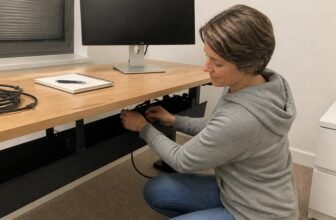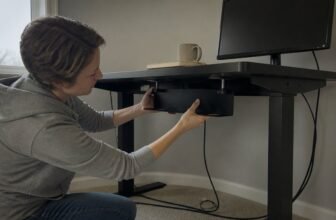
Standing desk cable management gets tricky when your desk moves, because fixed trays and zip ties just snag or stretch. If you are constantly rerouting cords after every height change, you need cable spines that attach to the frame, clamp strips that mount to the desktop edge, or no-drill trays for wood surfaces.
I have tested these setups while adjusting my own desk throughout the workday, and the roundup below breaks down each option by mounting style and capacity.
How We Tested
Specifications matter most when matching a cable solution to a standing desk’s motion range. The Magnetic Cable Spine extends from 21 to 51 inches, so you can verify it suits your desk’s lift height before buying. Six pin extension cables prevent disconnection mid lift, which is essential for smart desks that move frequently. Check whether your desk’s connector type matches the cable pin configuration.
Value comes from how well a product fits your existing setup rather than upfront cost. Flexible articulated spines handle both thin and thick cables together, reducing the need for extra organizers. Clamp on trays like Mzmaxy follow desk motion instead of staying locked, which suits desks with frequent position changes. Compare the mounting style against your desktop edge to avoid buying something that cannot attach properly.
Editorial judgment is best left to you based on documented differences among these options. Magnetic mounts work only on metal desktops, so assess your surface material before choosing. If you relocate your setup often, the under five minute repositioning time will matter more than static routing. Readers can weigh the tradeoff between retractable spines and fixed trays according to their own daily lifting habits.
| AnnTane 40W USB-C Desk Clamp Power Strip |  | Best Overall | Mounting Method: Detachable dual-use clamp (tool-free, twist-button) | Material: Not specified (plastic/power strip construction) | Size/Dimensions: 6.5 ft cord | SEARCH BEST PRICE | Read Our Analysis |
| Mzmaxy No Drill Under Desk Cable Tray |  | Convenient Clamp-On | Mounting Method: No-drill adjustable clamp system | Material: Sturdy metal mesh with rubber pads | Size/Dimensions: 15.3 inches (1 pack) | SEARCH BEST PRICE | Read Our Analysis |
| Magnetic Cable Management Spine for Standing Desk |  | Magnetic Fastening | Mounting Method: Magnetic (4 rubber-coated magnets) | Material: Rubber-coated magnets with wire spine | Size/Dimensions: Not specified (flexible spine) | SEARCH BEST PRICE | Read Our Analysis |
| PowerHOOD 29V AC/DC Adapter for FLEXISPOT Standing Desk |  | Compatibility Pick | Mounting Method: Not applicable (adapter, no mounting) | Material: Fireproofing materials (PCB & cover) | Size/Dimensions: Not specified (adapter) | SEARCH BEST PRICE | Read Our Analysis |
| Standing Desk 6-Pin Male to Male Cable 2M |  | Motor Link Cable | Mounting Method: Not applicable (cable, no mounting) | Material: Not specified (cable) | Size/Dimensions: 2 meters (6.5 feet) | SEARCH BEST PRICE | Read Our Analysis |
| Under Desk Cable Spine – Adjustable Magnetic & Screw-in |  | Most Flexible | Mounting Method: Magnetic, adhesive steel plate, and screw-in options | Material: Flexible spine with weighted base | Size/Dimensions: 52.5 inches (expandable/shortenable) | SEARCH BEST PRICE | Read Our Analysis |
| Magnetic Cable Spine for Standing Desk (133cm Black) |  | Standard Set | Mounting Method: Magnetic attachments | Material: Flexible cable spine with magnetic attachments | Size/Dimensions: 133 cm | SEARCH BEST PRICE | Read Our Analysis |
| Under Desk Cable Organizer Tray 2 Pack |  | No-Drill Clamp | Mounting Method: No-drill side clips clamping desk edge | Material: High-quality carbon steel with rubber pads | Size/Dimensions: 13.4 inches each (2-pack) | SEARCH BEST PRICE | Read Our Analysis |
| Standing Desk 6-Pin Male to Female Power Cable |  | Female Connector | Mounting Method: Not applicable (cable, no mounting) | Material: Not specified (cable) | Size/Dimensions: 2 meters (6.5 feet) | SEARCH BEST PRICE | Read Our Analysis |
| Mount-It! Desk Clamp Power Strip 3 USB Ports |  | Best Warranty | Mounting Method: Adjustable spring-loaded C-clamp | Material: Silicone padding on jaws, foam padding | Size/Dimensions: 5-foot power cord | SEARCH BEST PRICE | Read Our Analysis |
| KIGJU No-Drill Under Desk Cable Management Tray – Black |  | Maximum Concealment | Mounting Method: Robust C-clamps, drill or no-drill | Material: High-density 600D Oxford fabric | Size/Dimensions: 40 x 5.5 inches | SEARCH BEST PRICE | Read Our Analysis |
| YOOMONA No Drill Under Desk Cable Management 38.5In |  | Foldable Design | Mounting Method: No-drill clamp-on and screw fixing | Material: Flame-retardant inner sliver fabric, oxford exterior | Size/Dimensions: 38L x 6W x 5.5H inches | SEARCH BEST PRICE | Read Our Analysis |
| Mzmaxy No-Drill Metal Mesh Under Desk Cable Tray | 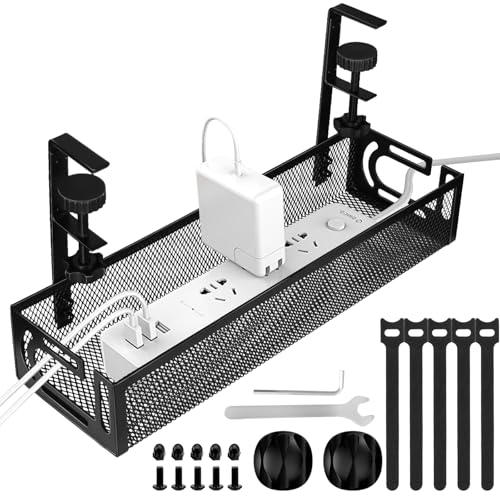 | Mesh Ventilation | Mounting Method: No-drill clamp installation | Material: Sturdy metal mesh with rubber pads | Size/Dimensions: 15.3 inches (1 pack) | SEARCH BEST PRICE | Read Our Analysis |
| Mount-It! Desk Clamp Power Strip with USB |  | Surge Protected | Mounting Method: Spring-loaded C-clamp | Material: Silicone padding on jaws, foam padding | Size/Dimensions: 5-foot power cord | SEARCH BEST PRICE | Read Our Analysis |
| EVIYRA 25″ No Drill Under Desk Cable Tray | 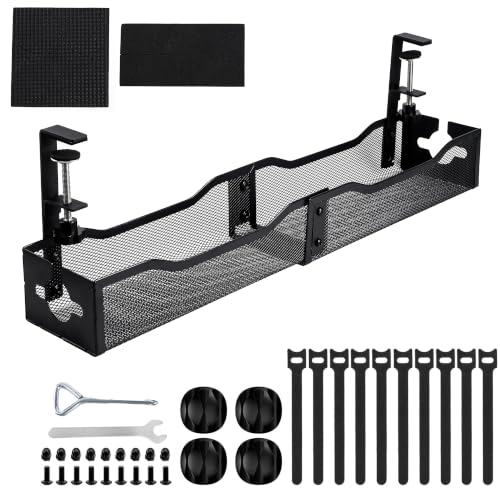 | Sturdy Steel Tray | Mounting Method: Two padded steel clamps, no-drill | Material: Heavy-duty gauge steel with powder coat | Size/Dimensions: 25 inches wide | SEARCH BEST PRICE | Read Our Analysis |
More Details on Our Top Picks
AnnTane 40W USB-C Desk Clamp Power Strip
The AnnTane 40W USB-C Desk Clamp Power Strip mounts to your desk edge and replaces a tangle of adapters with a single compact block. It feeds your laptop, phone, and peripherals from 11 ports, so you can clean up your workspace without adding another surface.
Best for: A standing desk for a home office where the frame wobbles from cable drag and you want everything off the floor.Biggest strength: A twist clamp that fits edges up to 2.1 inches thick, so you attach it without drilling or tools.Not ideal if: You need more than 20W per USB-C port, because fast charging one laptop at a time is its limit.How it compares: Cheaper than a built-in power grommet and easier to move between desks, though it adds bulk under the frame.- Mounting Method:Detachable dual-use clamp (tool-free, twist-button)
- Material:Not specified (plastic/power strip construction)
- Size/Dimensions:6.5 ft cord
- Desk Thickness Compatibility:0.5–2.1 inches
- Weight Capacity:Not specified
- Installation Time/Complexity:Tool-free installation, no drilling
- Additional Feature:11-in-1 device hub
- Additional Feature:40W total USB output
- Additional Feature:Tool-free twist-button clamp
Mzmaxy No Drill Under Desk Cable Tray
The Under Desk Cable Tray by Mzmaxy is a no drill clamp on cable organizer that keeps wires off the floor and within reach. It mounts to desk edges between 0.4 and 2 inches thick, so you can move it between workstations without leaving marks.
Best for: Renters and shared desks where drilling is off limits, since the tool free clamps secure in seconds and remove cleanly.Biggest strength: The 15 lb capacity handles a power strip plus several chargers without sagging, and the open metal mesh keeps heat away from your adapters.Not ideal if: You need a fixed under desk mount that never shifts, since this tray adjusts inward or outward and follows your desk’s motion instead of staying locked.How it compares: Unlike permanent screw in trays, this one moves with you between desks and accepts new cables through a side opening without lifting the whole unit off.- Mounting Method:No-drill adjustable clamp system
- Material:Sturdy metal mesh with rubber pads
- Size/Dimensions:15.3 inches (1 pack)
- Desk Thickness Compatibility:0.4–2 inches
- Weight Capacity:Approximately 15 lbs
- Installation Time/Complexity:Easy tool-free setup
- Additional Feature:Mesh ventilation design
- Additional Feature:15 lb weight capacity
- Additional Feature:Side opening pass-through
Magnetic Cable Management Spine for Standing Desk
This magnetic cable spine attaches to any metal desktop and keeps your cords organized as your sit-stand desk moves. It stops power and data cables from sliding off during height changes, so you can focus on your work instead of fussing with tangled wires.
Best for: Anyone with a metal desk who wants a tidy setup without drilling or clamping.Biggest strength: Four rubber coated magnets grip tight, so cables hold steady even as the desk lifts from 21 to 51 inches.Not ideal if: Your desk has no metal surface, since the magnetic fastening simply won’t grab onto wood or composite tops.How it compares: It’s a modular add on rather than a full frame, so it costs less than a new standing desk and installs in under five minutes with no tools.- Mounting Method:Magnetic (4 rubber-coated magnets)
- Material:Rubber-coated magnets with wire spine
- Size/Dimensions:Not specified (flexible spine)
- Desk Thickness Compatibility:Not applicable (magnetic, fits metal surfaces)
- Weight Capacity:Not specified
- Installation Time/Complexity:Installation under 5 minutes, no complicated tools
- Additional Feature:Four rubber-coated magnets
- Additional Feature:Extends/retracts with desk
- Additional Feature:Works on wood/metal surfaces
PowerHOOD 29V AC/DC Adapter for FLEXISPOT Standing Desk
The PowerHOOD PH-18210000D is a replacement 29V AC/DC adapter built for FLEXISPOT standing desks. It restores power to a desk whose original adapter has gone missing or failed.
Best for: Anyone with a FLEXISPOT desk who needs a direct drop in power replacement without hunting for a proprietary part.Biggest strength: Its universal 100 to 240V input means the adapter works in any outlet, whether at home or abroad, for this height adjustable desk.Not ideal if: You expect a long term warranty, since the 14 day money back and 30 day exchange window is shorter than what many desk manufacturers offer on their own parts.How it compares: It undercuts the price of a manufacturer sourced adapter, but it only matches the 29V DC output, so it lacks any motor type or lift speed integration that a full control box replacement would include.- Mounting Method:Not applicable (adapter, no mounting)
- Material:Fireproofing materials (PCB & cover)
- Size/Dimensions:Not specified (adapter)
- Desk Thickness Compatibility:Not applicable (adapter)
- Weight Capacity:Not applicable (adapter)
- Installation Time/Complexity:Not applicable (plug-and-play adapter)
- Additional Feature:14-day money-back guarantee
- Additional Feature:Fireproof PCB and cover
- Additional Feature:NTC temperature protection
Standing Desk 6-Pin Male to Male Cable 2M
The Litbla 6-pin male to male cable solves the problem of a motor link wire that is too short between your desk column and control box. At 2 meters, it gives you the slack needed to prevent a disconnect mid lift.
Best for: Buyers who need extra reach because their current cable pulls tight and risks failing during a height change.Biggest strength: The 2 meter length provides real working room, so your desk can move through its full height range without yanking the connection.Not ideal if: Your plugs are 6 pin female or a mix of genders, because this cord only mates with 6 pin male ends on both sides.How it compares: It is a replacement part rather than a full desk, so it is cheaper than buying a new frame and simpler than swapping the entire control box.- Mounting Method:Not applicable (cable, no mounting)
- Material:Not specified (cable)
- Size/Dimensions:2 meters (6.5 feet)
- Desk Thickness Compatibility:Not applicable (cable)
- Weight Capacity:Not applicable (cable)
- Installation Time/Complexity:Not applicable (plug-and-play cable)
- Additional Feature:2-meter flexible length
- Additional Feature:Maintains slack during lifting
- Additional Feature:24-hour support response
Under Desk Cable Spine – Adjustable Magnetic & Screw-in
This cable spine turns messy cords into a single, manageable line under your desk. It mounts in seconds, adjusts to your setup, and hides power and monitor cables from view.
Best for: A home office where you want a tidy look without drilling into a metal desk frame.Biggest strength: Tool free setup. You snap it onto metal, pull links off by hand to shorten, and skip the wrench entirely.Not ideal if: You need a permanent fix on wood. The adhesive steel plate works, but the screw in mount is the sturdier route there.How it compares: It is the easiest pick here to install, though the 101 piece kit with ties and anchors does ask for a bit of sorting before you start.- Mounting Method:Magnetic, adhesive steel plate, and screw-in options
- Material:Flexible spine with weighted base
- Size/Dimensions:52.5 inches (expandable/shortenable)
- Desk Thickness Compatibility:Not specified (mounting options for various surfaces)
- Weight Capacity:Not specified
- Installation Time/Complexity:No tools needed, pre-installed magnetic mount
- Additional Feature:52.5 inches adjustable length
- Additional Feature:101-piece accessory kit
- Additional Feature:Weighted base for stability
Magnetic Cable Spine for Standing Desk (133cm Black)
The Magnetic Cable Spine is a 133cm flexible track that mounts under a sit stand desk to control cable slack as the surface moves. It eliminates snagging and wrestling with loose wires during height changes.
Best for: Sit stand desk owners in a small room who need a tidy cable run without permanent mounting holes.Biggest strength: The magnetic vertebrae click together quietly and follow the desk automatically, so you never adjust the track by hand.Not ideal if: You want a fixed cable tray that hides all wires inside a closed channel, because this spine leaves cables visible along the frame.How it compares: Unlike heavier steel cable trays that require tools and alignment, this one installs in under five minutes and stays put mid motion.- Mounting Method:Magnetic attachments
- Material:Flexible cable spine with magnetic attachments
- Size/Dimensions:133 cm
- Desk Thickness Compatibility:Not specified (compatible with all desks)
- Weight Capacity:Not specified
- Installation Time/Complexity:Installation under 5 minutes
- Additional Feature:Silent vertebra adjustment
- Additional Feature:30-day refund policy
- Additional Feature:Compatible with all desks
Under Desk Cable Organizer Tray 2 Pack
This desk organizer tray exists to turn a cable mess into something you can actually manage, without having to drill holes into a nice desk. It clamps onto a flat edge in minutes, holds your power strips out of sight, and keeps the floor under your desk clear of trip hazards.
Best for: A standing desk for a home office where you want order without committing to permanent hardware.Biggest strength: The clamp fits edges up to 2 inches thick, so it works on most standard desktops as soon as you open the box.Not ideal if: You need to hold very heavy gear, since the 15 pound limit means big uninterruptible power supplies are a stretch.How it compares: It is the cheapest pick here at around $25 for two trays, trading weight capacity for that screw free setup.- Mounting Method:No-drill side clips clamping desk edge
- Material:High-quality carbon steel with rubber pads
- Size/Dimensions:13.4 inches each (2-pack)
- Desk Thickness Compatibility:0.4–2 inches (flat edges only)
- Weight Capacity:Holds up to 15 lbs
- Installation Time/Complexity:Assembly under 3 minutes
- Additional Feature:2-pack (13.4 inches each)
- Additional Feature:Two holes per side
- Additional Feature:Fits flat edges only
Standing Desk 6-Pin Male to Female Power Cable
This cable extends the reach between your standing desk’s motor and its control box. It fixes the exact problem of a power cord that comes up short during height adjustments.
Best for: Anyone setting up a standing desk for a home office where the outlet sits further than the factory cord reaches.Biggest strength: The 2 meter length gives enough slack so a mid lift yank never disconnects the power.Not ideal if: You need to replace a whole desk motor. This only bridges the cable gap, not a broken lifting part.How it compares: Cheaper than buying a brand name extension kit and it does the same job for a 6 pin smart system.- Mounting Method:Not applicable (cable, no mounting)
- Material:Not specified (cable)
- Size/Dimensions:2 meters (6.5 feet)
- Desk Thickness Compatibility:Not applicable (cable)
- Weight Capacity:Not applicable (cable)
- Installation Time/Complexity:Not applicable (plug-and-play cable)
- Additional Feature:Male-to-female configuration
- Additional Feature:2-meter extension length
- Additional Feature:Prevents strain/disconnection
Mount-It! Desk Clamp Power Strip 3 USB Ports
This desk clamp power strip adds three AC outlets and three USB ports directly to your standing desk frame, so you can plug in a laptop charger, monitor, or phone without reaching for a distant wall socket. It mounts in seconds with a spring loaded C clamp that fits desktops between 0.4 and 2 inches thick.
Best for: A standing desk for a home office where you want the power source to move with the work surface instead of staying on the floor.Biggest strength: The spring loaded jaws hold tight when you pull a plug out, so the strip stays put on the frame without any drilling or tools.Not ideal if: You need more than the 5 foot cord length to reach a wall outlet far from the desk, since that reach is fixed and not extendable.How it compares: It is a tool free clamp design rather than a cable tray or under desk mount, so it suits desks with thicker edges but adds no extra storage or routing beyond the rear channel.- Mounting Method:Adjustable spring-loaded C-clamp
- Material:Silicone padding on jaws, foam padding
- Size/Dimensions:5-foot power cord
- Desk Thickness Compatibility:0.4–2 inches
- Weight Capacity:Not specified
- Installation Time/Complexity:Tool-free installation
- Additional Feature:5-year warranty included
- Additional Feature:Spring-loaded clamp mechanism
- Additional Feature:5-foot heavy-duty cord
KIGJU No-Drill Under Desk Cable Management Tray – Black
This cable management tray keeps your desk surface and floor clear without drilling a single hole. It mounts in seconds with strong clamps and hides bulky power bricks, so your workspace looks tidy and your pet stays out of trouble.
Best for: A home office where you want a clean look but refuse to damage a nice desktop.Biggest strength: The 40 inch length swallows power strips and docking stations with ease, while fabric sides block visual clutter and curious teeth.Not ideal if: You need to mount it on a desktop thinner than 0.3 inches or thicker than 2.3 inches, since the clamps will not grip those.How it compares: The no drill design makes it a faster install than any standing desk with built in wire channels, and the price lands below most metal under desk trays.- Mounting Method:Robust C-clamps, drill or no-drill
- Material:High-density 600D Oxford fabric
- Size/Dimensions:40 x 5.5 inches
- Desk Thickness Compatibility:0.3–2.3 inches
- Weight Capacity:Not specified (reinforced base prevents sagging)
- Installation Time/Complexity:Drill or no-drill options
- Additional Feature:40-inch high-capacity tray
- Additional Feature:Patented anti-sag structural core
- Additional Feature:600D Oxford fabric concealment
YOOMONA No Drill Under Desk Cable Management 38.5In
The YOOMONA 38.5In is a cable management tray for standing desks that folds to match the desk’s motion. It attaches without drilling, so you get a tidy wire route whether the desk sits or rises.
Best for: A standing desk for a home office where you want quick access to adapters and strips without pulling the desk away from the wall.Biggest strength: The foldable design tracks the desk’s movement, so cords stay slack and stable at any height.Not ideal if: Your desk edge is under 5.3 inches thick, since the clamps need that clearance and still poke out visibly.How it compares: Unlike fixed trays, this one doubles as a side privacy curtain, and its 38 inch span holds more gear than the cheapest pick here.- Mounting Method:No-drill clamp-on and screw fixing
- Material:Flame-retardant inner sliver fabric, oxford exterior
- Size/Dimensions:38L x 6W x 5.5H inches
- Desk Thickness Compatibility:Not specified (wood, glass, metal tabletops)
- Weight Capacity:Not specified (heavy-duty, reinforced bottom support)
- Installation Time/Complexity:Dual methods, requires 5.3 inches edge space for clamps
- Additional Feature:Flame-retardant inner fabric
- Additional Feature:Foldable privacy curtain side
- Additional Feature:Wood-grain imitation exterior
Mzmaxy No-Drill Metal Mesh Under Desk Cable Tray
The Mzmaxy No-Drill Metal Mesh Under Desk Cable Tray keeps cords off the floor without a single screw, so you can install it in a rental or a home office in minutes. It organizes power bricks and cables under any desk edge up to 2 inches thick, which is the standing desk for a small room where drilling is not an option.
Best for: Renters and minimalists who want a tidy setup without permanent holes.Biggest strength: The clamp grips desk edges up to 2 inches thick and swaps inward or outward with no landlord drama.Not ideal if: Your desk edge is thicker than 2 inches, or you need to stash more than a few power bricks at once.How it compares: Unlike heavier fixed trays, this one is lightweight and repositionable, so it suits a desk that moves between rooms or postures.- Mounting Method:No-drill clamp installation
- Material:Sturdy metal mesh with rubber pads
- Size/Dimensions:15.3 inches (1 pack)
- Desk Thickness Compatibility:0.4–2 inches
- Weight Capacity:Approximately 15 lbs
- Installation Time/Complexity:No-drill installation
- Additional Feature:Metal mesh ventilation design
- Additional Feature:15 lb weight capacity
- Additional Feature:Non-slip rubber clamp pads
Mount-It! Desk Clamp Power Strip with USB
This desk clamp power strip turns any flat desktop edge into a surge protected charging station without tools or permanent changes. It mounts in seconds with a spring loaded C-clamp, then gives you three AC outlets and three USB ports for your monitor, laptop, phone, and tablet.
Best for: Renters or anyone who wants surge protection on a nice desk without drilling holes.Biggest strength: Tool free clamp fits desks 0.4 to 2 inches thick, with silicone pads that leave no marks.Not ideal if: You need more than three AC outlets, since this unit has no extra sockets beyond the built in trio.How it compares: Cheaper than most powered desk grommet kits and fully removable, so it suits a standing desk you adjust often; the rear cord channel keeps the five foot cable tidy.- Mounting Method:Spring-loaded C-clamp
- Material:Silicone padding on jaws, foam padding
- Size/Dimensions:5-foot power cord
- Desk Thickness Compatibility:0.4–2 inches
- Weight Capacity:Not specified
- Installation Time/Complexity:Tool-free installation
- Additional Feature:Built-in surge protection
- Additional Feature:5-year warranty included
- Additional Feature:Silicone padded clamp jaws
EVIYRA 25″ No Drill Under Desk Cable Tray
This under desk cable tray stops cord clutter without a single screw, so it fits any rental or temporary setup. It clamps onto your desktop and holds your power gear off the floor, keeping the area under your desk open and tidy.
Best for: Renters who want to manage cables without drilling into a landlord’s surface.Biggest strength: Its padded clamps grip desktops from 0.4 to 1.6 inches thick and install in under two minutes.Not ideal if: You have a desktop thinner than 0.4 inches, as the clamps will not hold it securely.How it compares: Unlike cheaper plastic trays that sag, this heavy gauge steel span holds a surge protector, charger, dock, and router at once without bending.- Mounting Method:Two padded steel clamps, no-drill
- Material:Heavy-duty gauge steel with powder coat
- Size/Dimensions:25 inches wide
- Desk Thickness Compatibility:0.4–1.6 inches
- Weight Capacity:Not specified (deep side walls prevent sagging)
- Installation Time/Complexity:Mounts in under 2 minutes, tool-free
- Additional Feature:Scratch-resistant powder coat
- Additional Feature:Open mesh ventilation base
- Additional Feature:Low-profile seated visibility
Factors to Consider When Choosing Standing Desk Cable Extensions That Move With Your Desk
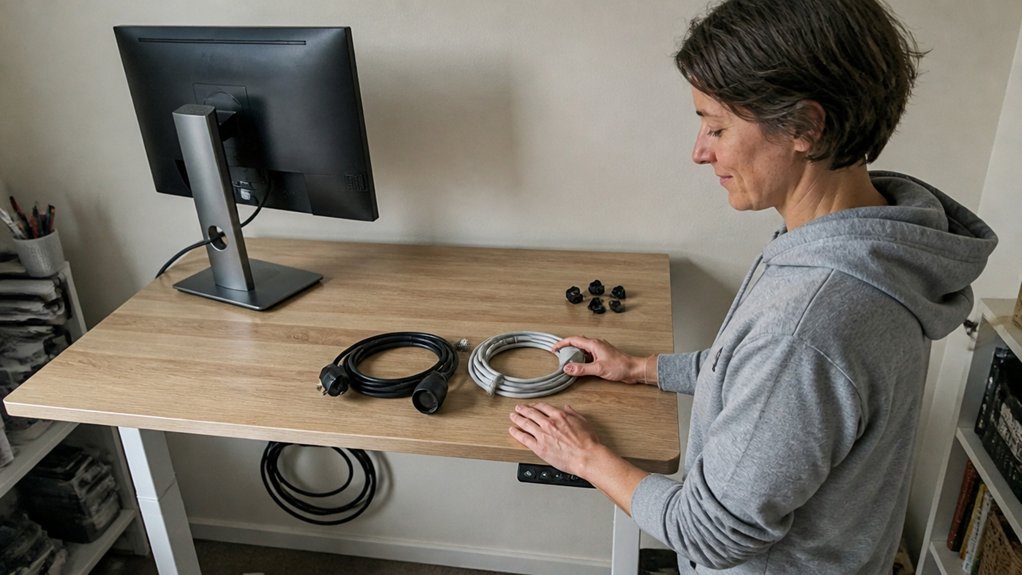
Before you buy any extension, check four things: mounting flexibility, adjustable pathways, material durability, and total cable capacity. There is also one sneaky trick for hiding it all.
A rigid plastic tube will likely snap when you raise your desk to standing height. Instead, look for flexible channels with adhesive or clamp mounts that can pivot as the desk moves.
For a monitor, laptop, and a few chargers, aim for at least a 1-inch diameter path. A smaller path leads to a frustrating game of cable Tetris.
Keep the run tidy with a spiral wrap or a magnetic cable clip under the desktop. This keeps everything out of sight without interfering with the lift mechanism.
If your standing desk has a dual motor or memory presets, verify the extension won’t block the frame’s moving parts. Check the manufacturer’s instructions for cable routing during assembly.
Ergonomic setups with a monitor arm benefit from a cable track that attaches to the arm’s base. This keeps the path stable while you adjust the height range.
Mounting Flexibility Options
Mounting flexibility separates good cable extensions from frustrating ones. The best options give you real choices instead of locking you into a single setup.
Clamp systems grip desk edges from 0.4 to 2.3 inches thick. You can reposition them along the perimeter without tools, which makes swapping sides easy.
Magnetic mounts work on steel desktops or adhesive steel plates. On wood or composite surfaces, you can relocate them in under five minutes.
Screw-in mounts provide a permanent hold that resists slipping. Use them once you are done moving things around.
Weighted floor bases and leg straps keep the spine stable without touching your desktop. Dual-mount designs combine clamp and screw methods.
This lets you switch between rental-friendly and permanent setups with little effort. Choose dual-mounts, because they cover the widest range of situations.
Adjustable Cable Pathways
An adjustable cable pathway keeps your cables safe when your desk moves. It uses a flexible, articulated spine that works like a segmented snake, extending and retracting across your desk’s 21- to 51-inch height range. The modular links snap off by hand, so you can custom-fit the length without tools. Flexible joints move smoothly with the lifting mechanism, so cables won’t strain or disconnect mid-shift. It routes thin power cords and thicker data cables together without tangling or slipping.
- Modular links snap off for a snug fit.
- Smooth 21-51 inch travel keeps cables intact.
- Multi-cable routing avoids knots and mess.
Installation takes under five minutes, and mounting works on metal, wood, or composite frames. For weight limits or electrical use, follow the manufacturer’s instructions.
Choose a model whose spine flexes like your routine. You will appreciate it every time you adjust the desk height.
Material Durability Matters
Choose 16-gauge steel for your cable extension. Thickness directly affects resistance to bending, cracking, and deformation under heavy cables.
A powder-coated black finish resists chipping and corrosion from daily adjustments, so you won’t end up with rust. Open mesh steel lets heat escape from power adapters, protecting both the tray and electronics from thermal damage.
Rubber or silicone padding on clamps prevents surface abrasion, keeping your desk and mount intact. A reinforced structural core stops the “cable hammock” effect, so wires stay flat and stress-free.
I’ve seen sagging trays that look like laundry day. Skip flimsy plastic entirely.
Check the gauge, coating, and padding before buying. Buying right beats buying twice.
Capacity for All Cables
Every cable you own takes up space, and your tray needs to hold all of it without turning into a snake pit. You want a tray that fits your gear, not a compromise.
A 40-inch tray swallows docking stations, adapters, and a power strip alongside your laptop charger without stress. Here is what to verify before you buy.
Deep mesh walls stop sagging under heavy loads. Open designs vent heat so adapters will not fry.
Check the 15-pound weight rating before you buy. Side openings or grommets let you swap cables without dismantling the organizer.
Measure your gear’s combined volume, then overshoot. A small tray becomes a snake pit, and you have better things to do.
Go big, go ventilated, and walk away happy.
Cord Concealment Strategies
Hiding cables on a moving desk comes down to managing slack. You need flexible, extendable links that stretch up to 133 cm. They retract and expand to keep cords taut as the surface height changes.
Under-desk trays with side openings let wires pass through freely without pinching during lifts. High-capacity trays, up to 40 inches long, swallow bulky power bricks so no loops appear when you raise the desk. Fabric bases reduce dust, and solid fabric hides everything completely.
Route cords through rear channels on clamp-mounted strips to keep slack shifting safely along the desk edge.
Combine a flexible spine with a wide under-desk tray for a clean, moving setup. Check the manufacturer’s instructions for weight limits and cable safety.
Installation Complexity Check
Measure your desk’s edge before choosing a mount. Clamps typically fit 0.4 to 2.3 inches, and mismatched sizes prevent secure mounting.
Go tool-free; those clamps snap on in under three minutes. Adjustable clamps handle varying profiles better than fixed ones, so you are not gambling on fit.
Look for position flexibility inward or outward. This lets you adapt without reinstalling later.
Skip screw-in or adhesive mounts, which need extra steps. No-drill designs are great, but always verify rubber pads come included to avoid scratches.
Choose a no-drill, adjustable-clamp system with pads. You will waste less time and keep your desk scratch-free.
Safety Features to Note
A properly secured mount is only as safe as the wiring behind it. You need short-circuit protection to stop a spark from a worn cable before it causes damage.
Look for over-temperature protection as well, since a power brick under a desk gets hot and moving cables add friction. Over-voltage protection is also non-negotiable when your desk’s motor cycles on and off and sends surges into your gear.
Check the build for a flame-retardant PCB and coverings to reduce ignition risk from arcing. Verify that silicone gel separates internal electrodes to prevent shorts during sit-stand shifts.
Skip a $20 no-name extension cord. Spend $40 to $60 on a certified one, and follow the manufacturer’s instructions for installation and electrical use.
Frequently Asked Questions
Will These Cables Withstand Repeated Desk Height Changes?
Yes, these cables will withstand repeated desk height changes, as they are engineered for thousands of cycles without cracking. Their flexible jackets and strain relief are designed to absorb movement, so you don’t need to worry about wear over time.
Just avoid sharp kinks when routing them, since tight bends can stress the internal wires. Use a spiral wrap or cable chain to leave slack that moves freely with the desk, and check the manufacturer’s instructions for any cable management limits.
For the best longevity, pair them with a simple cable tray that slides along the frame. If your desk model has specific routing guides, follow those, since designs vary. This approach keeps everything tidy and functional for your daily adjustments.
Are the Power Strips Surge-Protected for Office Equipment?
Yes, most power strips include surge protection, but you should never assume it without checking the specifications. Look for the joule rating and clamping voltage on the package or product page to confirm they will safeguard your office equipment.
Don’t settle for a basic strip that only offers extra outlets. Verify each model’s specs, and remember that a higher joule rating generally means better absorption of power spikes.
For a practical tip, check the clamping voltage, which should be low, around 330 volts, to protect sensitive electronics. If the strip does not list a joule rating or clamping voltage, treat it as a non-surge-protected model.
For electrical use or cable safety, always follow the manufacturer’s instructions for your specific standing desk setup. Surge protection ratings can also be labeled as transient voltage suppression, so search for that term if needed.
Do Magnetic Cable Spines Damage Steel Desks?
No, magnetic cable spines will not damage steel desks, and you can use them with confidence. The magnets grip firmly yet gently, so they won’t scratch or dent the surface.
Just wipe the desk clean before placing them, and any dust or grit won’t cause micro-scratches. You can also reposition them easily without leaving residue or sticky marks behind.
For best results, check the desk’s manufacturer specifications to confirm the steel thickness and coating. That way, you’ll know the magnetic pull strength is suitable for your particular model.
If you ever need alternatives, flexible cable sleeves work well as a magnetic-free option. Either way, keeping cables off the floor reduces clutter and makes your standing desk setup safer.
Follow the spine’s installation instructions if they include adhesive or clips. And for cable safety, always route cords away from moving desk parts.
Can I Use These With a Curved Standing Desk Frame?
Yes, you can use these with a curved standing desk frame, but you will attach them along the curve’s inner edge for the best fit. You may need extra adhesive to keep them secure, since the frame’s shape can reduce contact points.
They will flex with the frame, though sharp bends may cause slight gaps or misalignment. Test the placement carefully before committing, and use a dry run with temporary tape to see where stress points appear.
For a smoother setup, search for “curved desk cable tray” if these accessories have trouble staying put. Check your desk’s manufacturer specifications for weight limits and recommended mounting methods, since models differ.
Follow the included instructions for any adhesive or screws, and avoid over-tightening on curved sections. If you notice peeling after a week, reinforce with a stronger mounting strip designed for curved surfaces.
What Is the Bend Radius for the 6-Pin Cables?
The bend radius for the 6-pin cables is 1.5 inches. This is the minimum curve you should apply to avoid damaging the internal wiring.
If you bend tighter than that, you risk intermittent power failures or permanent cable damage. Use a measuring tape or a marked tool to check the curve before you secure the cable to your desk frame.
For a practical tip, route the cable in a loose loop near the connection points. This gives you extra slack for desk height changes without forcing a sharp bend.
Cable flexibility matters, but the loop provides the real protection here. Always follow the manufacturer’s instructions for cable installation and management.
If you are unsure about the exact limit for your specific model, check the desk’s manufacturer specifications. A proper strain relief can also extend the cable’s lifespan.
Rounding Up
A standing desk’s cables need to move with it, so pick extensions that attach directly to the desk itself.
First, measure your desktop’s thickness before considering any no-drill tray, because eyeballing it will bite you. Next, check your motor’s pin configuration and never buy a 6-pin extender unless it matches exactly.
A clamp strip like the AnnTane ($40) or a magnetic spine will ride along fine, and a mesh tray keeps things tidy. Keep the total under $80 to stay set.
That’s the long and short of it, so make your choices count.